Loopy
A personal crochet companion app — AI-assisted pattern reading, row-by-row progress tracking, and inspiration collection, all in one place. My first self-built mobile app. 一款個人鈎織助理應用程式 — AI 輔助解讀織圖、逐行追蹤進度、收藏靈感,全部整合在一起。我自己做的第一款手機軟體。
"I started crocheting as a beginner with no in-person instruction. AI helped me decode patterns — but everything lived in a single chat thread, and I kept losing my place." 「我是一個沒有人教的鈎織新手,靠 AI 幫我看懂織圖。但所有資訊都存在同一個對話視窗裡,很容易就找不到之前討論的內容。」
That frustration became the product idea. I needed something that could hold all the pieces of my crochet practice together: a place to save patterns from YouTube or PDFs, a row counter I could actually trust, a space to store inspiration. So I decided to build it myself — without a background in mobile development, using AI as my collaborator throughout the entire process. 這個挫折感變成了產品的起點。我需要一個能把鈎織過程所有環節整合在一起的工具:可以儲存 YouTube 或 PDF 來的織圖、一個真正可以信任的計圈器、一個收藏靈感的空間。所以我決定自己來做 — 沒有手機開發背景,整個過程都用 AI 當協作夥伴。
Pattern reading, assisted AI 輔助解讀織圖
Upload a YouTube video, screenshots, or PDF — Gemini AI extracts a row-by-row pattern you can actually follow. 上傳 YouTube 影片、截圖或 PDF,Gemini AI 自動整理成可以逐行跟著做的織圖。
Row counter with context 有脈絡的計圈器
Track your current row alongside the actual pattern instructions — no more switching between apps or losing your spot. 在顯示織圖說明的同時計算目前的行數,不用再在不同 App 之間切換或忘記做到哪裡。
Inspiration collection 靈感收藏夾
Save links from Instagram, YouTube, and Pinterest with automatic platform detection and preview — all your ideas in one scroll. 儲存 Instagram、YouTube、Pinterest 的連結,自動辨識平台並抓取預覽,所有靈感一目了然。
Status: In progress. 狀態:製作中。 Core features are built and deployed. User testing and final polish not yet started. 核心功能已完成並部署,尚未進行使用者測試與最終調整。
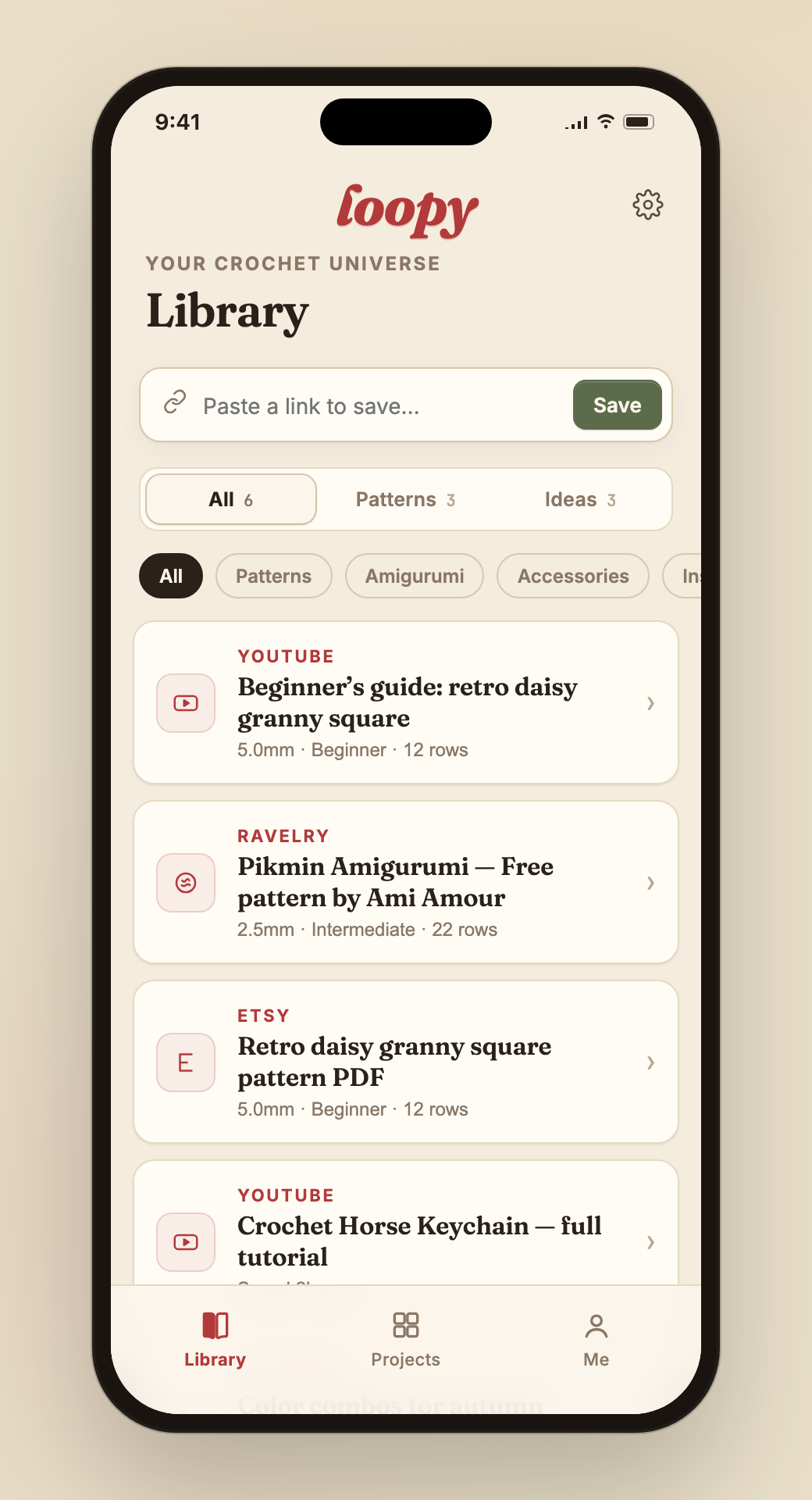
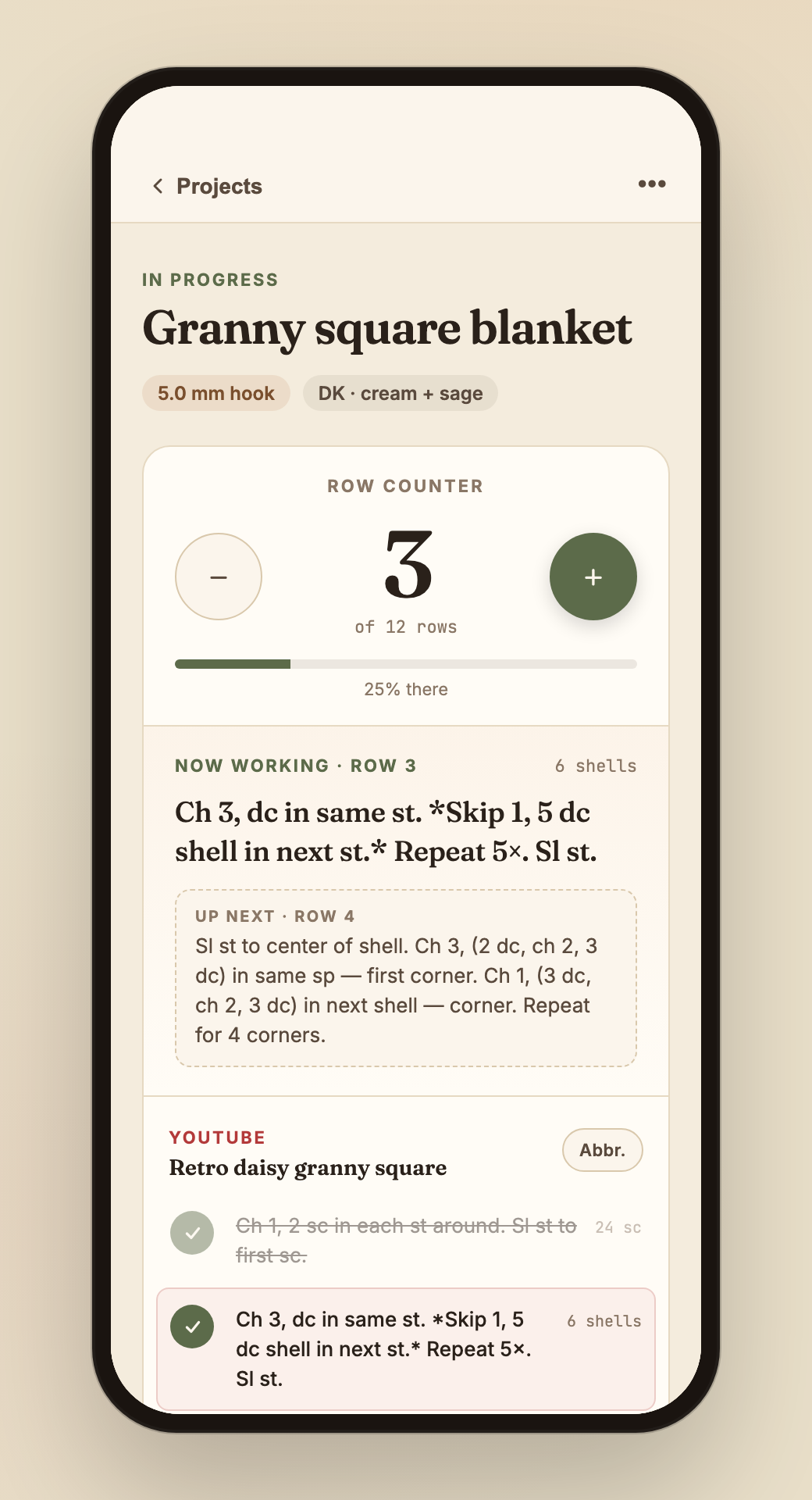
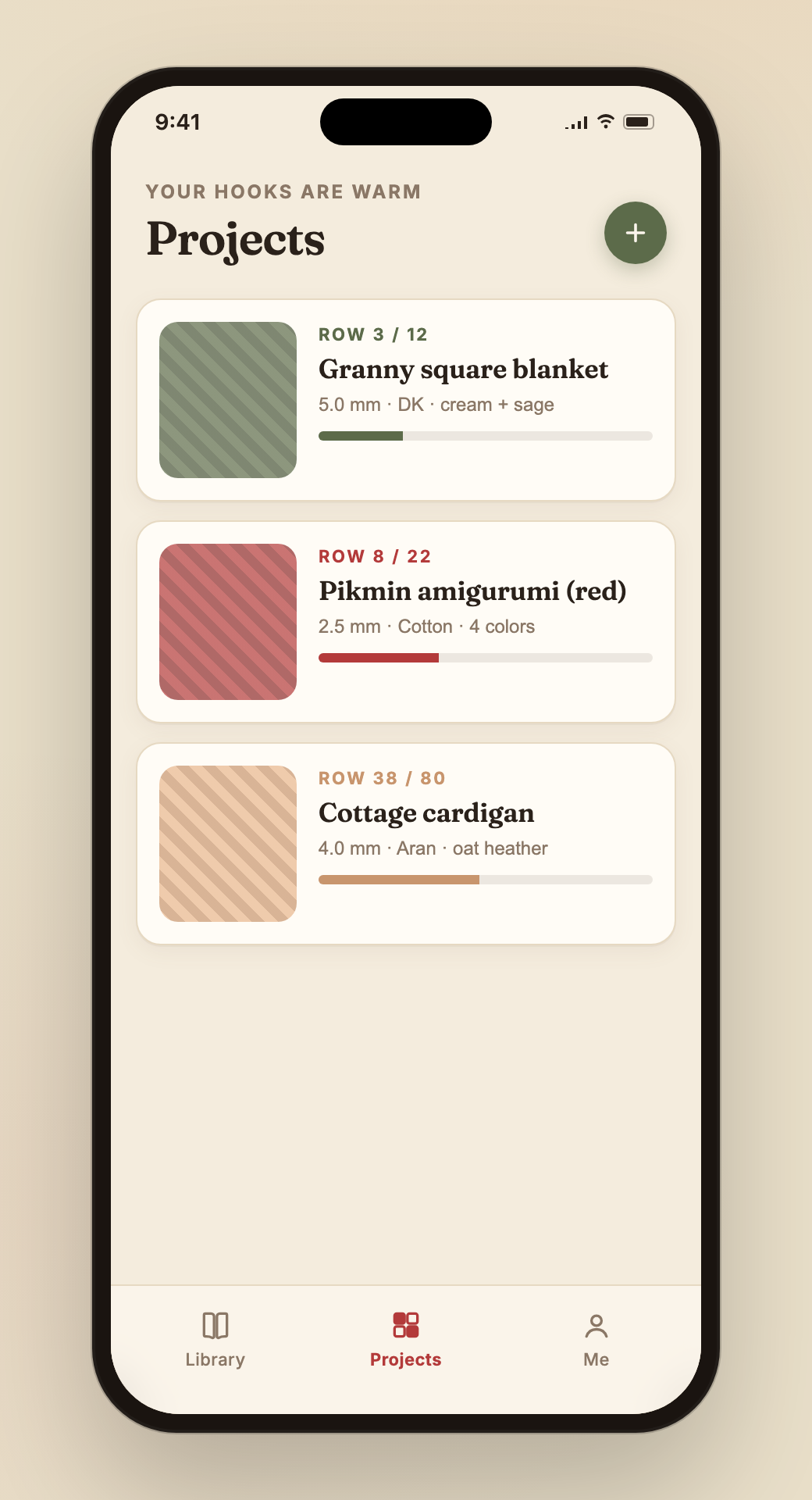
There were no wireframes. The design system document — written before any code — served as the single early artefact, defining visual constraints and component rules. From there, every structural decision was made and validated directly in the live interface. 這個專案沒有線稿。設計系統文件在程式碼之前就寫好,作為唯一的早期工件,定義視覺限制和元件規則。從那之後,每個結構性決定都直接在即時介面中做出並驗證。
Crochet is a two-handed, eyes-on-the-work activity. The phone is held in one hand while the other is stitching. A bottom tab bar keeps every section thumb-reachable without looking away or repositioning — a hamburger menu would require a deliberate gesture that interrupts the making flow. 鈎織是雙手都在工作、眼睛看著作品的活動。手機單手握著,另一隻手在織。底部 Tab Bar 讓每個功能都在拇指範圍內,不需要視線離開作品或重新握持手機 — 側欄選單需要一個刻意的手勢,會打斷創作流程。
This was the single most important UX decision in the app. The original pain point was switching between a chat thread (for pattern context) and a counter app — two separate tools, two separate contexts, constant interruption. Combining them into one screen removes that entirely: the row instruction is always visible alongside the count, so nothing is ever lost or forgotten between taps. 這是整個 App 最重要的 UX 決定。原始痛點就是在對話視窗(織圖脈絡)和計圈 App 之間切換 — 兩個工具、兩個脈絡、不斷中斷。把兩者合在同一個畫面徹底消除這個問題:每行的說明永遠和計圈數字並排顯示,兩個 tap 之間什麼都不會遺失或忘記。
Inspiration content is visual — a thumbnail-less list of URLs tells you nothing. Cards with automatic platform detection and preview thumbnails let you scan your saved ideas the same way you browse Instagram or Pinterest: visually, not textually. The collection becomes a moodboard, not a bookmark folder. 靈感內容是視覺的 — 沒有縮圖的網址清單毫無意義。帶有自動平台偵測和預覽縮圖的 Card 讓你像瀏覽 Instagram 或 Pinterest 一樣掃視已存的靈感:視覺化,而非文字化。收藏夾變成了情緒板,不只是書籤。
Loopy's visual language is built around a single metaphor: a handmade sketchbook. Every colour feels like it belongs in a yarn stash. The logo is a script wordmark with a crochet stitch texture fill — the core visual metaphor carried through the entire system. Loopy 的視覺語言建立在一個核心比喻上:手工製作的素描本。每個顏色感覺都像是從毛線盒裡拿出來的。Logo 是一個手寫字體,內部填充鈎針縫紋質感 — 這個視覺隱喻貫穿整個設計系統。

The wordmark uses a crochet stitch texture as fill — deep crimson base with terracotta rose stitches and pale cross-stitch marks. Only appears on white or cream backgrounds. 字體 Logo 以鈎針縫紋為填充 — 深紅底色、赭紅玫瑰色縫線、淡色交叉縫線點綴,只出現在白色或奶油色背景上。
Colour Palette 色彩系統
Background背景
Primary Green — Actions主要綠 — 互動
Accent Red — Brand Only品牌紅 — 僅用於品牌元素
Key Rules 設計原則
Loopy was built entirely by one designer — no engineers. Using Claude Code, I directed every technical decision from component architecture to Gemini API integration, entirely through conversation. I had the product vision and design system; Claude handled the code. Loopy 完全由一位設計師建造 — 沒有工程師。透過 Claude Code,我透過對話指引每一個技術決策,從元件架構到 Gemini API 整合,全部如此。我有產品願景和設計系統;Claude 負責程式碼。
Identified 4 friction points from my own crochet practice: no single place to save YouTube patterns, row counter apps with no pattern context, inspiration scattered across platforms, and AI conversations I kept losing. Each became a feature. 從自己的鈎織經歷中找出 4 個痛點:沒有地方統一儲存 YouTube 織圖、計圈 App 沒有織圖脈絡、靈感散落在各平台、AI 對話常常找不到。每個問題都成為一個功能。
Before writing a line of code, I defined the full visual language in a design style guide: brand identity, colour tokens, component colour map, typography rules, and what to avoid. This became the single source of truth for all subsequent AI collaboration. 在寫任何程式碼之前,我先在設計風格指南中定義完整的視覺語言:品牌識別、色彩 token、元件色彩對照表、字體規範,以及應避免的事項。這成為所有後續 AI 協作的唯一標準。
Started with a single React file (loopy.jsx) to validate all features quickly — inspiration collection, AI pattern modal, counter, project management, settings with invite gate. Once the logic was stable, migrated to a Vite project with proper component structure. 先用單一 React 檔案(loopy.jsx)快速驗證所有功能 — 靈感收藏、AI 織圖 Modal、計圈器、專案管理、有邀請碼機制的設定頁。邏輯穩定後,遷移到有正確元件結構的 Vite 專案。
Integrated Google Gemini 1.5 Flash to process YouTube links, video screenshots, and PDF files — outputting structured row-by-row patterns in two formats (Row-by-Row and Written). Built a mock fallback so the feature works in demo mode without an API key. 整合 Google Gemini 1.5 Flash,處理 YouTube 連結、影片截圖和 PDF 檔案,輸出兩種格式的逐行結構化織圖(逐行格式與書寫格式)。建立 mock 備援,讓功能在沒有 API key 的情況下也能以示範模式運作。
The app is live at loopy-khaki.vercel.app with a VIP invite-code gate and a black cat easter egg onboarding screen. User testing and final polish have not yet started — this is still a work in progress. App 已上線於 loopy-khaki.vercel.app,有 VIP 邀請碼機制和黑貓彩蛋引導畫面。使用者測試和最終調整尚未開始,目前仍在製作中。